
DECK//SWITCH: the Elgato Stream Deck on Linux
DECK//SWITCH drives the Elgato Stream Deck on Linux, where the manufacturer offers no software: keys, dials and touchstrip are assigned in a dedicated editor, and an open plugin system handles everything beyond that. Developed and tested on the hardware with a Stream Deck + on Arch Linux, KDE Plasma on Wayland.
About this project
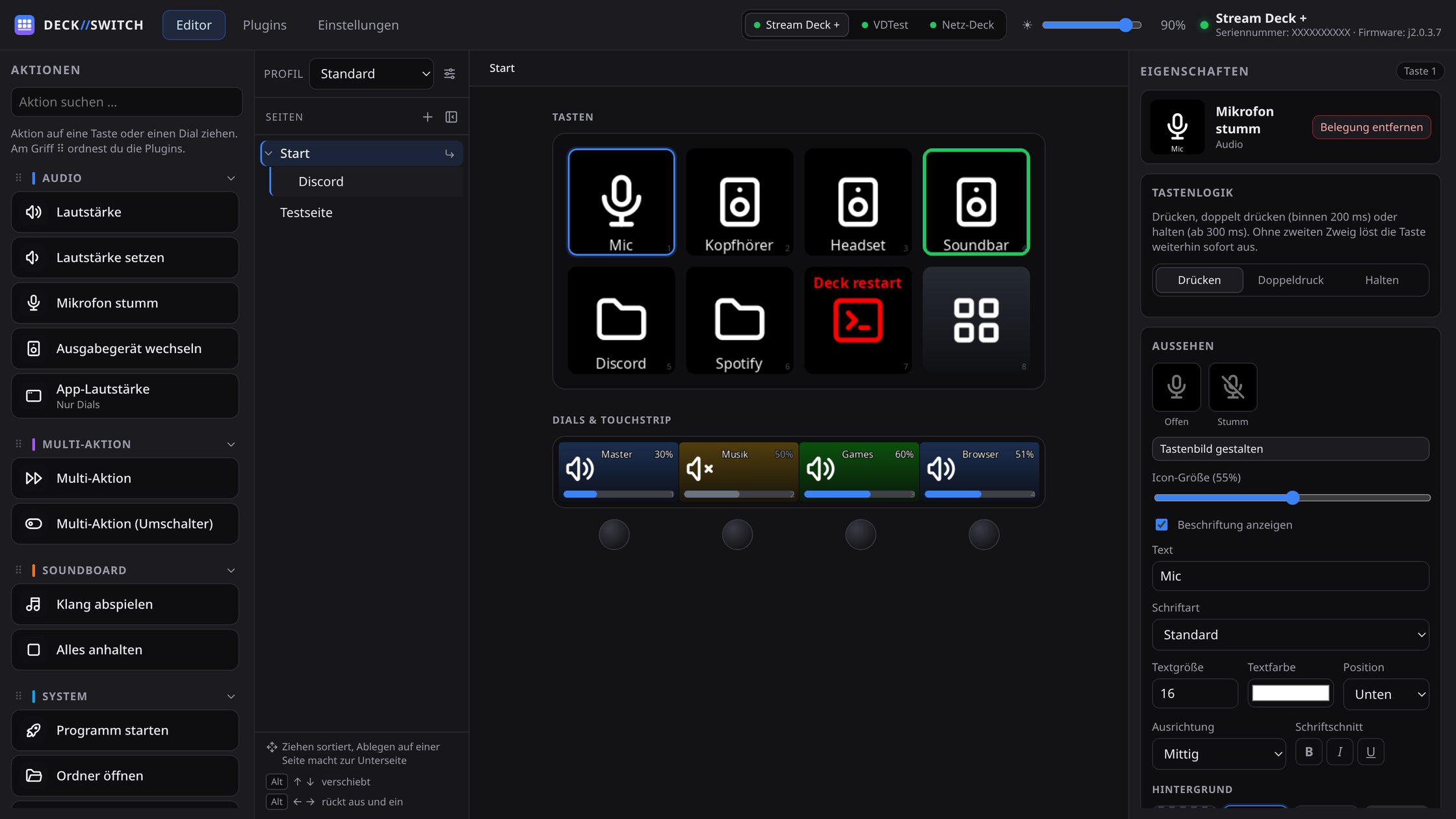
Standalone control software for the Elgato Stream Deck on Linux, entirely without Elgato's own application: keys, dials and touchstrip are assigned in a browser-based editor, and key images are rendered by the backend. On top of that, an arbitrarily deep page tree, multi-actions, several devices at once, a virtual deck as a screen overlay, a network deck operated through a browser, and an open plugin system.
Features at a glance
- Three actions per key, dials with a dial stack, and the touchstrip
- Arbitrarily deep page tree, multi-actions with pauses and looping
- Key images with icon, lettering, background and animated GIFs
- Several devices at once, matched by serial number
- Virtual deck as an overlay and a network deck in the browser
- Open plugin system: anyone can contribute their own plugins
Why I built it
Elgato ships its control software for Windows and macOS. On Linux the device stays a piece of hardware with no way to operate it. For the Stream Deck + there is an added problem: dials and touchstrip can do considerably more than "key presses shortcut", and that is exactly the part most existing workarounds leave out entirely. Rather than getting by with a script per key, I built the control layer myself, with an interface where assignments can be set up the same way they can under Windows.
Keys, dials and pages
Every key knows three actions: press, double press and hold. Dials either work continuously or trigger a separate action per direction of rotation, and several assignments can share one dial. Pages form an arbitrarily deep tree, sortable by drag and drop: folders are simply sub-pages rather than a second concept placed beside them. Multi-actions run several steps in sequence, with pauses as steps in their own right and optionally on a loop. The look and lettering of each key are designed in a built-in workshop; rendering always happens in the backend, so the preview shows exactly what ends up on the device.
Virtual deck and network deck
Not every assignment needs hardware. The virtual deck places a freely gridded overlay on the screen, with no window frame, no entry in Alt-Tab and without stealing keyboard focus, which is the decisive point during a game or a stream. The network deck goes the other way: somebody else on the same network operates a deck in their browser, a moderator during a broadcast for instance. Password protected, no installation required, and the guest cannot change assignments.
Plugins
Actions come from plugins, not from the core. Seven are built in: audio, OBS, Discord, system, soundboard, multi-action and navigation. Two more can be installed afterwards, and the API is open for your own. Icon sets are plugins too. Installation happens from a ZIP file, from a URL, or through a protocol link in the browser; a marketplace for finding and installing them from inside the application is planned. That separation is the reason the project can grow without every new feature touching the core.
How it is built
The backend is Python with FastAPI and talks to the device through python-elgato-streamdeck; the interface is a Tauri application with Vite and React that uses the system WebView instead of shipping its own Chromium. The rest is Linux integration: volume and output devices through PipeWire, a virtual keyboard through /dev/uinput with the layout from libxkbcommon, media and shortcut control through D-Bus and MPRIS, and the overlay through the Wayland layer-shell protocol. Bindings to systems with no ready-made integration are exactly the part of my work that is hard to get out of a website builder.
More projects
Need something built?
I build web applications, APIs and Android apps, and I run them afterwards. The same care that goes into my own tools goes into client work.